Social commerce has matured to the point where major platforms now support end-to-end selling directly inside their apps. You can list products, process payments, manage orders, and handle returns without hosting a standalone website. For small business owners, independent creators, and first-time entrepreneurs in the UAE, this lowers the barrier to starting a legal retail operation to its lowest point yet.
This guide provides a technical walkthrough of how to set up and operate both TikTok Shop and Instagram for selling, covering legal requirements, registration steps, product management, payment flows, and fulfillment processes specific to UAE sellers.
Legal and Regulatory Requirements
Selling goods commercially in the UAE, including through social media, requires a valid trade license under Federal Decree-Law No. 14 of 2023, which governs modern technology-based trade. Operating without one exposes a business to fines, platform account suspension, and potential legal action.
License Options for UAE-Based Sellers
DED E-Trader License (Dubai): Issued by Dubai's Department of Economy and Tourism (DET), this license allows UAE nationals and eligible GCC nationals residing in Dubai to sell products through social media channels and e-commerce platforms. The annual fee is AED 1,070. Expatriates in Dubai are restricted to the professional variant of this license (covering services, not physical product trade), so expatriate residents selling physical goods must use a different structure.
Commercial E-Commerce License (Mainland): For those not eligible for the E-Trader license, a commercial license with e-commerce activity from the relevant emirate's Department of Economic Development is the correct route. Abu Dhabi uses ADDED; Dubai uses DET; other emirates have their own DEDs. All mainland e-commerce licenses additionally require a no-objection certificate (NOC) from the Telecommunications and Digital Government Regulatory Authority (TDRA), which oversees the UAE's e-commerce regulatory framework.
Free Zone License: UAE free zones such as Dubai CommerCity, IFZA, and UAQFTZ offer e-commerce licenses permitting online trade locally and internationally, with 100% foreign ownership and no requirement for a local sponsor. This is often the most practical route for expatriate entrepreneurs selling physical products.
Documents and Bank Account
Standard documents required across license types include a valid passport (color copy), Emirates ID for UAE residents, proof of UAE residence (visa or utility bill), and three proposed trade names compliant with DED naming conventions.
To receive payouts from TikTok Shop, you need a UAE bank account registered under the same legal name as your trade license. The name on your ID, trade license, and bank account must match exactly — any discrepancy triggers manual review or rejection at the platform level.
(This information is for general guidance only and is subject to change. For the most accurate and up-to-date details, please check the official website)
Part 1: How to Set Up and Sell on TikTok Shop
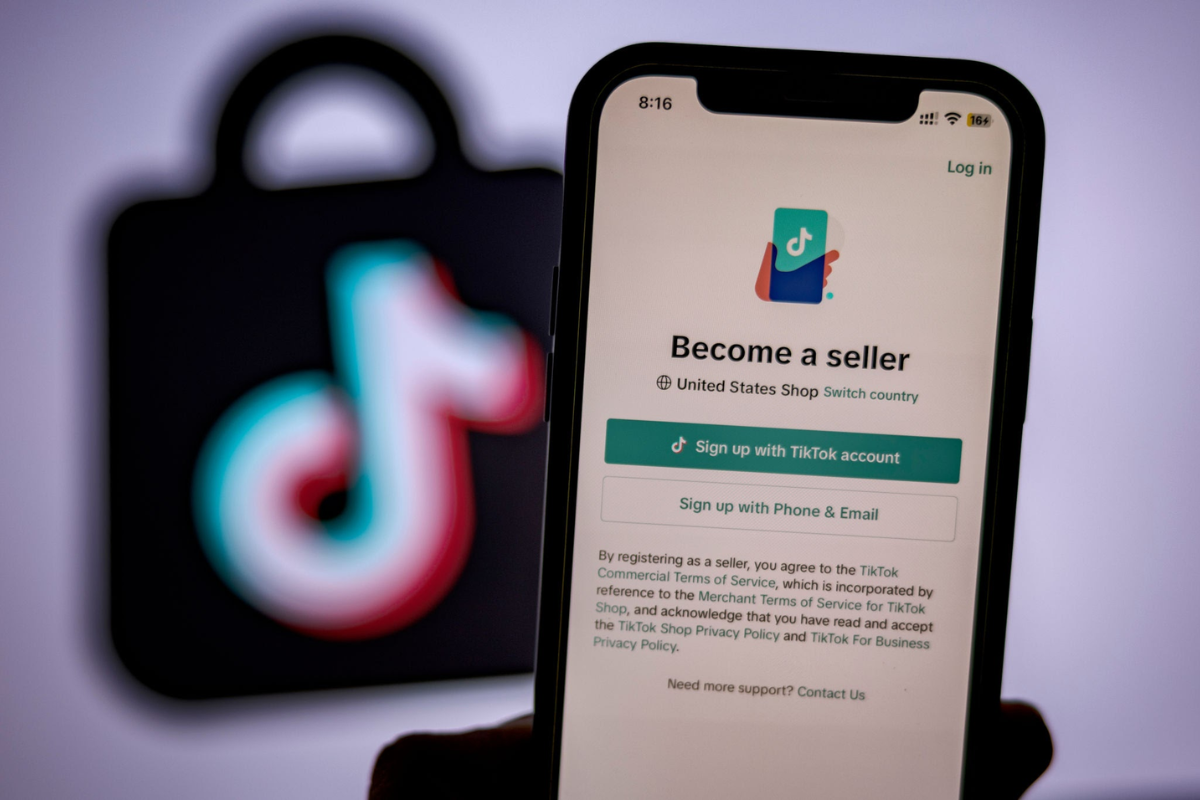
TikTok Shop processes the complete transaction inside the TikTok app. A buyer discovers a product through a video, live stream, or shop tab, adds it to their cart, and completes payment without being redirected anywhere external. Sellers do not need a website, payment gateway account, or third-party checkout software. The full order lifecycle — from cart creation to payment capture to post-purchase communication — happens within TikTok's ecosystem. As of 2026, TikTok Shop is available to sellers in the UAE via the Seller Center at seller-ae.tiktok.com.
Step-by-Step Onboarding Process
Step 1: Create a Seller Account
Go to seller-ae.tiktok.com and click "Sign Up." Register using an existing TikTok account, phone number, or email. Select "Corporate/Company" if registering as a business entity, or "Individual" for sole proprietors operating under a personal license.
Step 2: Enter Business and Logistics Information
Enter a warehouse/pickup address for dispatching orders and a return address for processing returns. Both must be full street addresses — PO Box entries alone are insufficient. Include accurate contact details for each address.
Step 3: Upload Verification Documents
The documents required for UAE sellers are:
- A clear digital copy of your valid trade license (DED, free zone, or equivalent)
- Emirates ID or passport for the account holder or principal corporate member
- A UAE bank statement or bank letter confirming your account details under the matching business name
Upload documents in JPEG or PDF format. All documents must be current. TikTok's review team typically processes applications within 3–5 business days; regulated product categories may take 7–10 days.
Step 4: Accept the Seller Policy
Read and accept TikTok Shop's Seller Terms of Service and regional seller policy before approval. These outlines prohibited product categories, listing standards, and performance benchmarks that affect your account standing.
Product Catalog Management
Once approved, you build your catalog entirely within the Seller Center — no website is needed.
To add a product: navigate to Products → Add New Product, then enter the product name, category, and description. Upload images at a minimum 500×500 pixel resolution in JPEG or PNG format against a neutral background, with no watermarks. Set price, stock quantity at the SKU level, product variants (size, color), and shipping weight. Submit the listing for platform review.
Products in regulated categories (electronics, cosmetics, food) may require UAE conformity certificates or health authority approvals before a listing goes live. Update stock quantities manually after every sale made through any other channel to prevent overselling.
Order Fulfillment and Logistics
TikTok Shop offers two shipping modes:
TikTok Shipping: Purchase a pre-negotiated shipping label directly through the Seller Center, print it, and hand the parcel to the assigned courier. Tracking updates sync automatically to the buyer's in-app order view.
Seller Shipping: Arrange your own courier (Aramex, DHL, Emirates Post, or a local delivery provider) and manually enter the tracking number and courier name into the order record in the Seller Center. The buyer views tracking through TikTok's order interface.
Sellers must ship within the processing window set during store setup — typically 1–2 business days. Exceeding this window reduces your seller performance score, which affects how often your shop appears to buyers.
Receiving Payouts
TikTok Shop releases funds every 7–14 days after order completion and expiry of the buyer's return window. Payouts transfer directly to your registered UAE bank account.
Referral Fee: TikTok charges a referral fee on every completed sale, calculated using this formula:
Referral Fee = (Customer Payment + Platform Discount − Tax) × Fee Rate
The "Platform Discount" term is important: when TikTok funds a promotional voucher or deal, that subsidy is added back into the fee base, so you are charged commission on the full pre-discount value even though TikTok reimburses the discount separately in your payout. Fee rates vary by market and product category. The UAE Seller Center publishes the current rates applicable to your account — check under Finance → Fee Rates before finalising your pricing, as rates are updated periodically.
New Seller Promotion: Sellers who complete their first sale within 60 days of onboarding receive a discounted 3% referral fee rate for the first 30 days. Standard category rates apply automatically after that window closes. Build your pricing model around the standard rate, not the promotional one.
Refund Administration Fee: When a refund or return is processed, TikTok refunds your referral fee minus a Refund Administration Fee of 20% of the original referral fee, capped at the AED equivalent of $5 per SKU (per the May 2025 update). If the order is cancelled before shipping, this fee does not apply.
Part 2: How to Set Up and Sell on Instagram
Meta deprecated native in-app checkout on Instagram for most regions and business types. Transactions now complete on an external URL — Instagram functions as a product discovery and traffic channel, not a payment processor.
A fully website-free setup using Instagram's native Shopping features is therefore not currently possible. Two practical paths exist for UAE sellers without a full standalone website:
- A hosted payment link page — a publicly accessible page from a UAE payment gateway (Telr, PayTabs, Network International) that serves as the required checkout URL for Commerce Manager
- Instagram Direct Messages with payment links — closing sales manually through DMs by sending a payment link from a UAE-registered gateway to each buyer
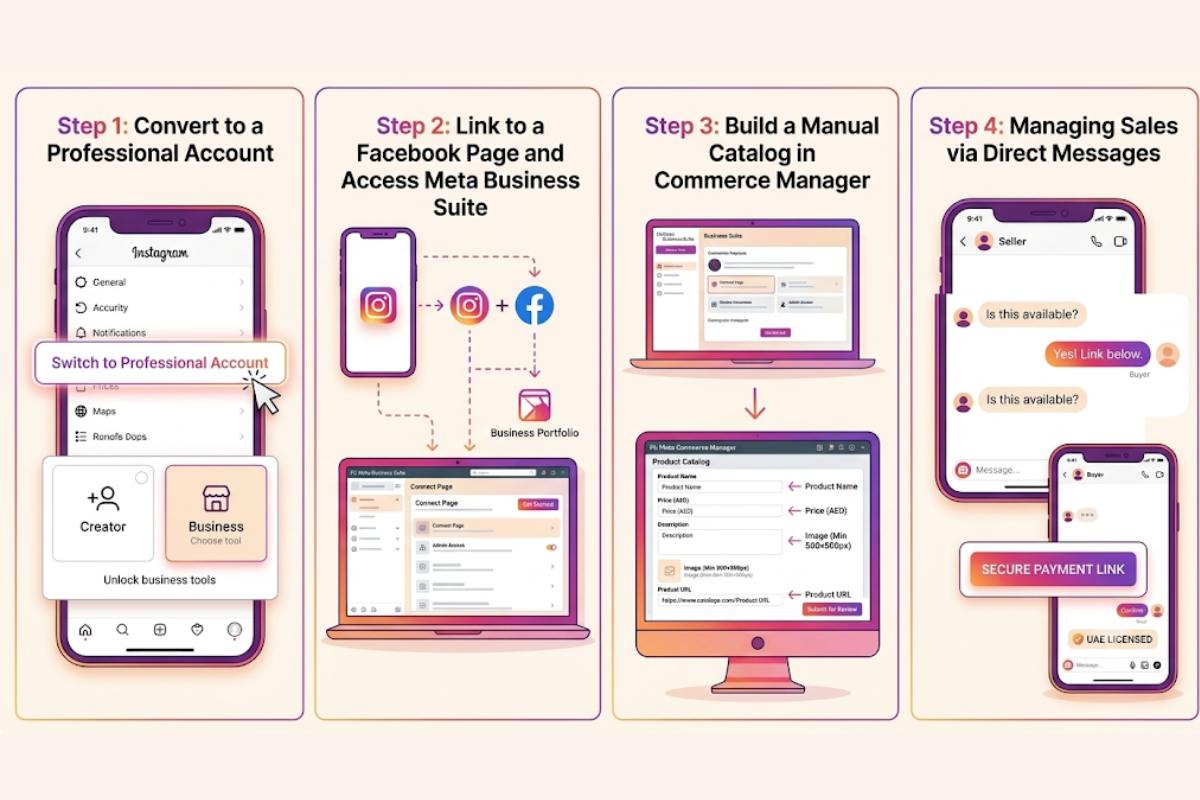
Step 1: Convert to a Professional Account
In the Instagram app, go to Settings → Account → Switch to Professional Account and select Business or Creator. Personal accounts cannot access Commerce Manager, product tagging, or business analytics.
Step 2: Link to a Facebook Page and Access Meta Business Suite
Go to Settings → Business → Connect a Facebook Page. You must be an administrator of the page you select. If no page exists, create one during this step. Then go to business.facebook.com to confirm both accounts are connected under the same Business Portfolio.
Step 3: Build a Manual Catalog in Commerce Manager
Go to business.facebook.com/commerce and click Get Started → Create a Shop. When prompted to select a checkout method, choose Website and enter your payment link page URL. This page must be publicly accessible and display your business name, shipping terms, and return policy — Meta's eligibility review checks for these elements.
In Commerce Manager, select Catalog → Add Items → Add Manually. For each product, provide:
- Product name and description
- Image (minimum 500×500 pixels, JPEG or PNG)
- Price in AED
- Availability status
- A product URL pointing to the checkout page for that item
After adding items, click Finish Setup, agree to Meta's Seller Agreement, and submit for review. The review process can take up to 4 weeks. Once approved, go to Instagram Settings → Business → Shopping, connect your catalog, and enable product tagging across posts, Reels, and Stories.
Step 4: Managing Sales via Direct Messages
For sellers not yet ready to use Commerce Manager, Instagram DMs combined with a payment link tool provide a complete transaction path:
- A buyer comments on or replies to a product post or Story
- The seller sends a DM with product details, price, and a payment link from a UAE-registered gateway
- The buyer pays through the secure gateway page
- The seller receives confirmation and proceeds with fulfillment
This complies with UAE financial regulations provided the payment gateway is licensed, and the seller holds a valid trade license.
Fulfillment and Order Tracking
Instagram has no native order management dashboard for website-checkout sellers. Communicate tracking information directly to buyers via DM:
- Retrieve the buyer's shipping address from your payment gateway or checkout tool
- Book a UAE courier (Aramex, DHL, Emirates Post, or local same-day service)
- Obtain a tracking number and send it to the buyer via DM, along with the courier name and expected delivery window
Part 3: Operational Strategies
Inventory Control
Selling on two platforms simultaneously creates the risk of overselling the same unit before either system is updated.
Use a master inventory spreadsheet with columns for SKU, total units on hand, units listed on TikTok Shop, and units allocated for Instagram orders. Set a stock buffer — for example, list only 80% of available units on TikTok Shop and reserve the remainder for Instagram DM orders. Update this sheet immediately after every sale. When a product reaches zero, mark it "Out of Stock" in TikTok Seller Center and remove or archive its product tag in Instagram Commerce Manager.
Track each product variant (size, color) as a separate row. TikTok Shop manages variant-level inventory natively; Instagram does not, making manual tracking essential.
On TikTok Shop: The Seller Center includes a built-in messaging module for buyer-to-seller communication. Returns and refunds are managed under Orders → Returns and Refunds. When a buyer raises a return request, approve or dispute it within your defined window. Approved returns trigger automatic refunds after the item is received and confirmed.
On Instagram: All customer communication goes through DMs. For refunds, log in to your payment gateway dashboard, locate the transaction, and issue the refund from there. Confirm the refund amount and timeline to the buyer via DM.
Respond to messages on both platforms within 24 hours. TikTok Shop tracks seller response rates and uses them as a factor in determining listing visibility.
TikTok Shop provides a complete, website-free sales channel in the UAE — from product listing and in-app checkout to logistics labels and direct bank payouts — through its Seller Center and native transaction infrastructure. Instagram's native checkout was deprecated in 2025, but UAE sellers can still operate effectively using catalog product tags linked to a payment gateway page, or by closing sales via DMs with payment links.
Both approaches are legally sound when paired with a valid UAE trade license. All registration documents, bank account names, and identity records must match exactly across your business license and both platform accounts.
Social commerce in the UAE does not require a website to be legal, operational, or scalable. It requires the right license, precise document preparation, accurate inventory management, and consistent use of the tools each platform provides.
Also read:
 HiDubai Newswire
 Shahba Mayyeri
 Shahba Mayyeri